Python and the eMudhra Certificate Crisis: Critical Severity and Mandatory Actions
A critical certifi trust-store incident can let an on-path attacker impersonate HTTPS services used by Python applications and package installers. Verified fixes for pip, certifi and uv; emergency Python releases; safe bootstrap commands; and a mandatory checklist for virtual environments, CI and containers.
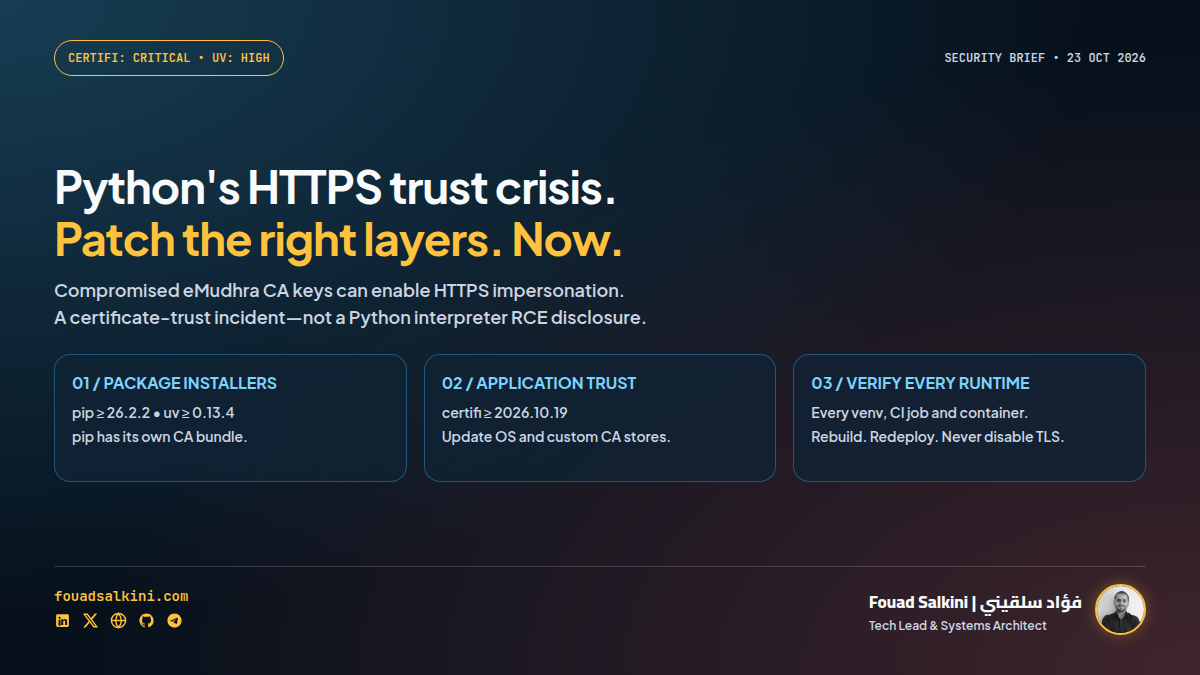
Treat this as an urgent certificate-trust incident—not as a claim that every Python server has a remote-code-execution vulnerability.
The private keys of eight eMudhra intermediate certificate authorities were compromised. Those keys can enable fraudulent certificates that a still-vulnerable HTTPS client may accept. An attacker who can intercept a connection could impersonate its destination and potentially read or modify traffic. Mozilla independently confirmed the incident. [1][6]
Last checked: 23 October 2026, Asia/Beirut. The recommendations below are based on the official Python security guidance, the certifi and uv maintainers, and Mozilla—not solely on the incident website.
Issue level: Critical for certifi; urgent remediation for affected clients
- certifi: its advisory GHSA-6q48-6c7w-9gw2 is rated Critical. It currently lists no known CVE; do not invent a CVE or a numeric CVSS score. [2]
- uv: its separate advisory GHSA-hq85-5cpj-mr62 is rated High and directs affected users to upgrade immediately. These are package-specific classifications, not one universal score for Python. [7]
- The failure: compromised certificate-authority trust can undermine HTTPS authentication. It is not an interpreter memory-corruption or RCE disclosure in the evidence reviewed here. [2][4][7]
Operational priority: identify and patch affected trust stores and package installers immediately. Do not put a known-affected build, deployment or outbound HTTPS integration through an ordinary maintenance backlog without an explicit, documented mitigation.
The impact on a particular service depends on the trust store it actually uses and whether an attacker can intercept its traffic. The advisory does not establish that every application has been exploited, that PyPI was breached, or that every Python website’s own TLS private key was exposed. [4][6][7]
Why updating your browser is not enough
A browser and a Python application need not use the same trust store. Mozilla blocked the affected intermediate certificates through OneCRL; it also removed the associated root from NSS for downstream consumers. A browser’s successful update is not proof that a virtual environment, package installer or container is protected. [6]
Python’s official warning specifically includes potential interception of connections to python.org and pypi.org. That matters because package installation is a supply-chain entry point, not merely a browsing session. [4]
The easy-to-miss detail: pip has its own vendored certifi. The Python discussion states that upstream pip loads those bundled CAs in addition to the system trust store. Updating the application’s standalone certifi package—or distrusting the root only in the OS—does not reliably remediate an old upstream pip. [4]
Verified corrected versions
These are the fixes confirmed at publication, not a promise that this list covers every downstream product:
- certifi:
2026.10.19or newer. The first security fix was2026.10.18; Python recommends.19for compatibility with unaffected emSign roots. [2][4] - pip:
26.2.2or newer. This bundles certifi2026.10.19. A standalone certifi update does not replace this requirement for affected upstream pip installations. [4][5] - uv:
0.13.4or newer. This removes the affected root from its bundled trust store. Its advisory also documents system/custom-store mitigations, but those require confirming the actual CA contents and configuration. [3][7] - Python emergency releases:
3.15.1,3.14.9, and3.13.17. All update the bundled pip to26.2.2with certifi2026.10.19. These are emergency releases for the named branches—not evidence that older Python branches are unaffected. [5]
For distribution-managed packages, follow the distribution’s security advisory and full package revision: a vendor may backport a fix without matching the upstream version string. Do not overwrite OS-managed Python with a blanket pip command.
Mandatory actions for owners of affected environments
Here, mandatory means the operational completion criteria for this incident—not a claim about a particular legal or compliance requirement.
1. Inventory every actual environment
Check production applications, workers, scheduled jobs, CI runners, developer environments, notebooks, package-build machines and container images. Do not stop at the python executable in your current shell.
Within each intended application environment, start with:
python --version
python -m pip --version
python -m pip show certifi
uv --version
The final command applies only if uv is installed. A missing standalone certifi package does not prove pip’s internal certificate bundle is safe. Record each environment’s interpreter path, dependency lockfile, certificate source and installer version.
Python explicitly instructs users to upgrade existing virtual environments. Installing a corrected base interpreter is not a substitute for checking them. [4][5]
2. Repair pip’s trust path before fetching more packages
The Python team provides a hash-pinned wheel URL to bootstrap the corrected pip. Copy the entire command, including the SHA-256 fragment, into the intended virtual environment. [4][5]
python -m pip install "pip @ https://files.pythonhosted.org/packages/3f/06/3e4420302363fbb71be3c7f35ce042f54bfca330e3e66b3a2e3c4cca579f/pip-26.2.2-py3-none-any.whl#sha256=fd7f4dfa8190e014013b9f08f3e973f4e4c26ffd179a204895533a7254813a70"Compatibility boundary: that pip wheel requires Python 3.10 or newer. I checked its PyPI metadata and downloaded the wheel without installing or executing it; its SHA-256 matched both PyPI and the official Python notice. This validates the referenced artifact, not your deployment.
For a Python environment older than 3.10, do not infer safety from an installation failure. Use a vendor-supported compatible remediation or migrate the environment. Preserve backups and verify application compatibility; do not force an incompatible pip onto a legacy interpreter.
The hash pins the expected downloaded wheel. It does not make an already-compromised machine trustworthy. Obtain the command and digest from the official Python notice using an up-to-date, trusted path.
3. Update application bundles and uv separately
After correcting pip, update certifi in the intended environment:
python -m pip install --upgrade "certifi>=2026.10.19"
python -m pip check
Apply compatible dependency changes to the project’s lockfile and rebuild from it; an interactive update that the next deployment reverses is not remediation.
If uv is used, update the uv executable actually invoked to 0.13.4 or newer using its installation method. For a pip-installed uv in this same supported environment, that can be:
python -m pip install --upgrade "uv>=0.13.4"
uv --version
A system-package or standalone uv installation requires its own update path. Updating certifi does not update uv’s embedded CA bundle. The uv advisory specifically warns that this incident affects other software with bundled CAs too. [7]
4. Refresh OS trust and rebuild containers
Apply the operating system vendor’s CA-certificate security update. Update custom or application-specific CA bundles as well; document any justified exceptions rather than assuming a package update covers them. [1][4][7]
The Python notice calls for rebuilding container images with layer caching disabled, so certificate updates are not silently inherited from a stale layer. Use a fresh, corrected base image and actually refresh the relevant OS/dependency packages in the Dockerfile. [4]
For a trusted, reviewed Dockerfile:
docker build --pull --no-cache -t your-app:patched .Replace the example image name with the intended target. --pull and --no-cache alone cannot fix a Dockerfile that deliberately pins vulnerable packages, a base digest that remains outdated, or an offline mirror that has not received the fix.
Redeploy affected applications and restart long-lived processes so the updated configuration and certificate data are used. Check the running image/environment—not just the successful build log.
5. Verify before declaring the incident closed
Inside each affected runtime, inspect the actual Python environment and bundle locations:
import sys
import ssl
from importlib.metadata import PackageNotFoundError, version

print("Python executable:", sys.executable)
print("Python version:", sys.version.split()[0])
print("Default TLS paths:", ssl.get_default_verify_paths())

for package in ("pip", "certifi", "uv"):
    try:
        print(package, version(package))
    except PackageNotFoundError:
        print(package, "not installed in this environment")

try:
    from pip._vendor import certifi as pip_certifi
    print("pip bundled certifi:", getattr(pip_certifi, "__version__", "unknown"))
    print("pip CA file:", pip_certifi.where())
except ImportError:
    print("pip uses a different packaging layout; consult the vendor")
This is a read-only inventory aid, not a cryptographic certificate-validation test. Distribution repackaging, custom bundles and external uv executables can require additional checks. A successful request to an ordinary HTTPS website does not prove the compromised chain will be rejected.
Close the operational task only after:
- Every affected environment has a corrected installer and trust store, or a verified vendor-documented mitigation.
- Dependency pins, CI templates, base images and deployment manifests preserve the fix.
- The actual running processes use the corrected environment.
- Application HTTPS integrations and package installation have been smoke-tested without disabling verification.
- Owners have reviewed available logs and exposure. Rotate potentially exposed credentials if investigation warrants it; do not claim all credentials or all website certificates were compromised solely from this advisory.
What not to do
- Do not set
verify=False, disable TLS checks, or add--trusted-hostto bypass the incident. That removes the protection being repaired. - Do not treat a browser update as application remediation. [6]
- Do not assume updating certifi fixes pip’s vendored bundle. [4]
- Do not assume an old Python branch is safe because it is absent from the emergency-release list. [5]
- Do not announce PyPI compromise, universal Python RCE or observed exploitation without evidence. The cited notices do not establish those claims. [4][6]
Bottom line
Critical certificate-trust exposure deserves immediate action. Precision matters: patch the installers and trust stores your software actually uses, then prove the running environments received the fix. Updating one Python installation is not the same thing as closing this incident.
Sources:
[1] https://emudhra.we-have-a-problem.com/ — Incident and downstream impact.
[2] https://github.com/certifi/python-certifi/security/advisories/GHSA-6q48-6c7w-9gw2 — certifi: Critical.
[3] https://github.com/astral-sh/uv/releases/tag/0.13.4 — uv corrected release.
[4] https://discuss.python.org/t/information-for-python-users-regarding-emudhra-emsign-ca-certificate-security-incident/109576 — Official Python guidance and secure pip bootstrap.
[5] https://blog.python.org/2026/10/python-3151-3149-31317/ — Official emergency Python releases.
[6] https://blog.mozilla.org/security/2026/10/20/protecting-firefox-users-following-the-compromise-of-emudhra-intermediate-certificates/ — Mozilla’s independent confirmation.
[7] https://github.com/astral-sh/uv/security/advisories/GHSA-hq85-5cpj-mr62 — uv: High.

Written by Fouad Salkini (فؤاد سلقيني)
General Manager & Tech Lead at Tripnologies and Sync Studios. Systems Architect focusing on AI coding agents, DevOps, and quantitative systems.